
Froggy Weather
JaePeaTeaWeather
4.1189.00 Reviews
- Version
- 2.1.4
- Installs
- 100.00K
- Age Rating
- Everyone
Screenshots
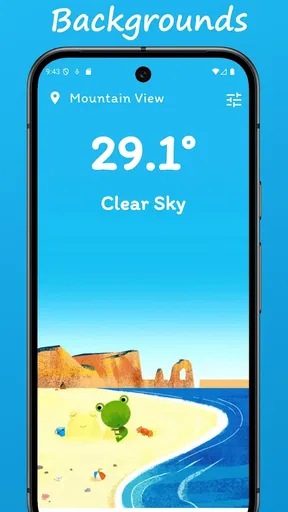
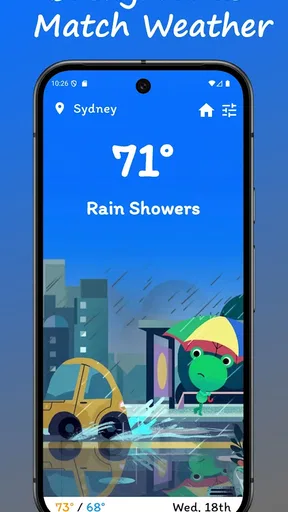
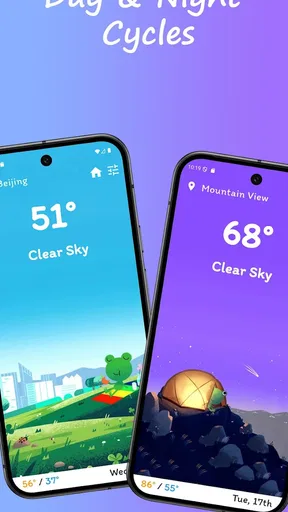
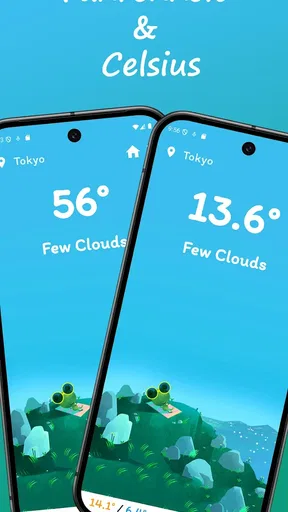
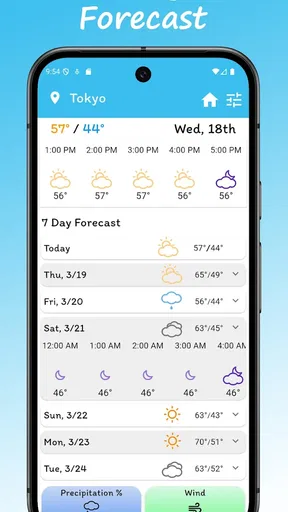
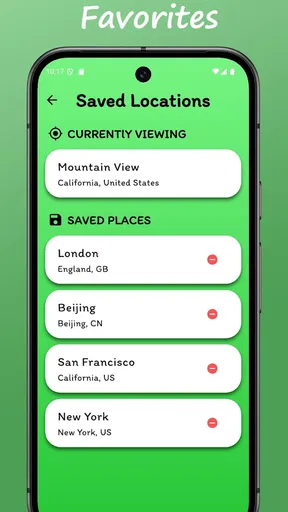
Our Review of Froggy Weather
 Analysis by Appyee
Checking the weather should take less time than deciding what to wear, yet many weather apps turn a quick glance into a small research task. They surround the forecast with maps, alerts, cards, advertisements, and menus before giving me the one answer I wanted: should I take a jacket, carry an umbrella, or change my plans? Froggy Weather takes a much quieter approach. It is a free weather app from JaePeaTea, built around a simple forecast view and Google's familiar cute frog backgrounds.
That simplicity is the main reason I found it appealing. I do not open it expecting a complete weather workstation. I open it when I want a fast visual check without sorting through a crowded interface. The frog artwork gives the app personality, while the basic purpose remains clear. For everyday decisions such as commuting, walking the dog, hanging laundry, or deciding whether an outdoor plan is sensible, that restraint can save a surprising amount of time.
My overall impression is that Froggy Weather works best as a quick-answer tool, not as a replacement for a detailed meteorological service. It is easy to approach, suitable for Everyone, and available at no cost. The important question is whether its deliberately simple style matches the way you use weather information.
Why a smaller weather app can be more useful
The recurring problem with weather apps is not usually finding weather information. It is getting the relevant part quickly. A large service may be useful when I need radar, severe-weather notifications, hourly changes, air-quality details, or a long-range planning view. But those tools can also make a routine check feel heavier than necessary.
Froggy Weather addresses the opposite need. Its store summary describes a simple weather app using Google's cute frog backgrounds, and that description reflects the experience I had with it: the visual identity is noticeable, but it does not compete with the basic task. The backgrounds make the forecast feel less sterile than a row of numbers, which is especially welcome when I am opening the app repeatedly during a normal day.
I would describe it as a lightweight companion for people who already know what they want from a weather screen. If your question is “What is the weather like right now?” or “Does today look suitable for a short trip?”, the uncluttered presentation makes sense. If your question is “How will a storm develop across the next several hours?”, a more specialized alternative will probably serve you better.
The app has reached over one hundred thousand installs and holds an average rating of 4.1 from around one thousand three hundred ratings. Those figures suggest that the straightforward concept has found an audience, although they do not change the central trade-off: a smaller feature set can feel wonderfully calm until you need a tool it was never designed to replace.
The first useful setup is deliberately uncomplicated
My advice is to treat the first launch as a quick orientation rather than a long customization project. Start by checking that the displayed location is the one you actually care about. This matters more than choosing a decorative preference because a weather app is only useful when its context is correct. If you regularly move between home, work, and another place, decide which location deserves the fastest access before relying on the app for routine decisions.
Then spend a moment observing how the frog background relates to the current conditions. The artwork is not just a technical forecast table, so it helps to read the visual mood alongside the actual information shown. I would not use the illustration as a substitute for checking the forecast details, but it gives the app a friendly glanceable quality that makes opening it feel less like consulting a dashboard.
One practical habit is to use Froggy Weather for the first decision of the day, then use a more detailed service only when the situation calls for it. That two-step workflow avoids asking a simple app to answer complicated questions. For example, I might open Froggy Weather while getting dressed, and only move to a radar-focused app if rain appears likely during a longer journey. This keeps the routine fast without pretending that every weather decision has the same level of risk.
Another useful setup choice is deciding when a visual glance is enough. For clothing, a short walk, or a casual errand, the app's simplicity is an advantage. For a flight, a hike, a sports event, or a long drive, I would build in extra checking time. The app can remain the first stop, but it should not automatically be the last one when conditions could change the safety or success of a plan.
How the frog backgrounds affect everyday use
The frog theme is more than a novelty, but it is also not a forecasting feature. Its value is emotional and practical: it gives me a quick visual cue and makes the app easier to recognize in a crowded phone. A weather screen that feels pleasant is more likely to become part of a daily routine, especially for someone who dislikes the dense presentation common in larger weather products.
There is a small trade-off here. People who prefer precise, neutral interfaces may find the cute presentation less serious than they want, even when the underlying purpose is useful. I did not see the visual style as a problem for ordinary checks, but I would understand choosing another app if you want weather information presented with technical emphasis from the first screen.
The best way to use the backgrounds is as a prompt to pause for the actual conditions rather than as a decorative wallpaper to ignore. I found that the visual approach encouraged a quick habit: open the app, notice the overall situation, read the relevant forecast information, and close it. That is a better workflow than opening a large service and getting pulled into unrelated panels.
Daily scenarios where it saves time
Consider a typical morning commute. I am leaving soon, not planning an expedition. I need to know whether light clothing is sensible and whether I should add rain protection to my bag. Froggy Weather fits that moment because it gives me a focused weather check without demanding that I interpret several layers of information. If the conditions look ordinary, I can get on with the morning instead of spending another minute navigating.
The same applies to walking a dog or taking a child to school. The decision is often immediate and practical: is the route comfortable, and do I need to prepare for unpleasant weather? The app's friendly visual treatment makes it approachable for someone who may not want a technical forecast, while the free price removes the need to justify adding another utility to the phone.
I also found the app useful before short errands. When I am deciding whether to walk to a shop, cycle somewhere nearby, or wait for a better moment, a simple weather view is often more useful than a full map. It reduces the friction between thinking about the weather and acting on it. That is a modest benefit, but it is exactly the kind of repeated benefit that makes a small utility worth keeping.
For outdoor plans, I would use it as a first filter. If the day looks comfortable, I can continue planning. If the forecast suggests a changeable or unpleasant day, I would verify conditions with a more detailed source before committing. This is one of the most important practical boundaries: Froggy Weather can help me decide whether further checking is necessary, but I would not make high-consequence plans from a single quick glance.
It can also work well for people who are easily distracted by feature-heavy apps. A weather service with many panels may be powerful, but power creates choices. Froggy Weather reduces that decision load. I can open it for the weather and leave without being encouraged to explore a collection of unrelated screens.
Friction removed, and friction that remains
The clearest friction it removes is visual overload. A simple weather app has a narrow job, and Froggy Weather keeps that job visible. The frog backgrounds provide a recognizable identity, while the weather information remains the reason to open the app. I appreciate that balance because it feels designed for repeated, brief use rather than occasional deep investigation.
It also removes financial friction. The app is free, so trying it does not require a purchase decision. That makes it easy to compare with the weather tool already installed on a phone. If Froggy Weather feels faster for your routine checks, you can keep both: one for the quick look and another for detailed analysis.
The app supports devices running Android 7.0 or later, which gives it a broad practical reach among Android users. Its current version is 2.1.4, and the release history began on September 26, 2024. I mention those details because compatibility matters when choosing a utility you want to keep around, especially on an older phone. The app is not positioned as a premium specialist product; it is a small, accessible option for a familiar everyday task.
Where friction remains is in the very simplicity that makes it attractive. If I need to compare several locations, study changes by the hour, inspect a weather map, or prepare for severe conditions, I may have to switch to another app. That switch is not a failure, but it means Froggy Weather is most efficient when I accept its role instead of expecting it to cover every weather-related need.
Another trade-off is that a visual-first design may not suit every reading preference. Some users want dense numbers and detailed controls immediately. Others want a clean glance and a little character. Froggy Weather clearly leans toward the second group. Before making it your only weather app, ask yourself whether you usually make quick local decisions or whether you regularly investigate forecast patterns.
Who should use it, and who should choose something else
I would recommend Froggy Weather to someone who wants a friendly, low-friction way to check the weather during ordinary days. It is particularly suitable if you dislike crowded weather interfaces, prefer a visual presentation, or want a free app that can answer basic planning questions quickly. It may also appeal to households where a less technical design feels more inviting than a professional forecast dashboard.
The app is not the right choice for someone whose main weather needs involve detailed analysis. If you plan outdoor work around changing conditions, travel through areas with uncertain weather, follow storms, or need specialized environmental information, a comprehensive weather service is the better primary tool. You can still keep Froggy Weather for quick checks, but relying on it alone would create an avoidable gap in your preparation.
I would also skip it if the frog aesthetic is not your taste. The visual theme is central to the app's identity, so there is little point choosing it while wishing it looked like a formal scientific instrument. A weather app should be pleasant enough that you want to open it; if the presentation makes you hesitate, another option will be more effective even if it has a busier interface.
Its Everyone content rating makes it an easy app to consider for general household use. That does not automatically make it perfect for every age or preference, but it reinforces the approachable character of the product. JaePeaTea has focused on a narrow idea rather than trying to turn the app into a complete weather platform, and I think that focus is both its strongest quality and its clearest limitation.
My verdict after using it as a daily shortcut
Froggy Weather is valuable when the goal is to remove a small daily annoyance: getting a quick weather impression without wading through unnecessary detail. I like the way the frog backgrounds give the app warmth, and I found the simple approach well suited to mornings, short errands, and casual outdoor decisions. The free price makes experimentation easy, and its broad Android compatibility means it can fit comfortably into many existing phone setups.
I would not present it as the only weather tool for serious planning. Its strength is speed and approachability, not depth. The sensible workflow is to make it the first glance, then move to a more detailed alternative when the forecast could affect safety, travel, or a longer commitment. That division of labor lets the app do what it does well without judging it for lacking features outside its purpose.
For me, the deciding question is simple: do you want weather information to feel like a quick daily check or a detailed investigation? If you want the first, Froggy Weather is an enjoyable and practical choice. If you need the second, keep looking. Its 4.1 average rating and growing install base show that the focused idea works for many people, but the best experience comes from recognizing exactly where that focus helps you and where it asks you to use another tool.
Verdict
Strengths of Froggy Weather
- Playful frog-themed design makes weather checks more enjoyable.
- Clear daily forecasts are easy to scan at a glance.
- Useful weather details help with planning outdoor activities.
- Lightweight interface feels responsive on most modern devices.
- Weather information is presented in a friendly, approachable style.
Limitations of Froggy Weather
- Some advanced forecast tools may be unavailable without upgrades.
- The whimsical design may not suit users wanting a formal weather app.
- Forecast accuracy depends on the selected location and data provider.
- Limited customization may disappoint users seeking extensive controls.
- Frequent weather checks can increase battery and data usage.
Similar Picks in This Category
View All
Weather - By Xiaomi
Xiaomi Inc.4.1

Weather & Radar Forecast
WetterOnline4.8

Weather
OneLouder Apps4.6

AccuWeather: Weather Radar
AccuWeather3.6

The Weather Channel - Radar
The Weather Channel4.6

1Weather Forecasts & Radar
OneLouder Apps4.3
Frequently Asked Questions
What is Froggy Weather and what does it offer?
Froggy Weather is a weather application designed to provide quick access to current conditions and forecasts in a simple, visually friendly interface. Depending on your location and device permissions, it can show temperature, precipitation, wind, humidity, forecasts for upcoming hours or days, and other useful details. It is intended for everyday planning rather than professional meteorological analysis.
Does Froggy Weather require my location, and is it safe to use?
Froggy Weather may request access to your location so it can automatically display weather information for your current area. You can usually deny this permission and enter a city manually instead, although automatic updates may be less convenient. Before installing, review the app’s privacy policy and the permissions requested through the Google Play Store or Apple App Store, particularly if privacy is a major concern.
How accurate are Froggy Weather forecasts?
Forecast accuracy in Froggy Weather depends on the weather data provider, your location, update frequency, and the natural uncertainty of weather prediction. Current conditions and short-term forecasts are generally more dependable than predictions several days ahead. The app should be treated as a helpful planning tool, not a replacement for official warnings from local authorities during severe weather, storms, flooding, or other emergencies.
Can Froggy Weather send weather alerts and notifications?
Froggy Weather may support notifications for forecast updates, rain, temperature changes, or severe weather, depending on the version of the app, your region, and your phone’s operating-system settings. Notifications normally need to be enabled manually, and battery-saving restrictions can prevent timely delivery. After installation, check both the app’s notification settings and your device permissions if alerts are important to you.
Is Froggy Weather free, and does it include advertisements or in-app purchases?
The availability of free features, advertising, subscriptions, or one-time purchases can vary between Android and iOS versions and may change with future updates. Before downloading, check the app’s store listing for the current pricing information, supported features, and subscription terms. If Froggy Weather offers premium options, confirm what they unlock and whether a recurring payment is required before starting any trial.
